

Description
Download Laver and Woods Cricket Scorebook – Cricket Score Tracking, Statistics, Analysis
Overview
The Laver and Woods Cricket Scorebook is a dedicated productivity tool designed for cricket enthusiasts, match officials, and statisticians who require a reliable method to record and analyze match data. Developed for the Windows platform, this software offers a streamlined solution for tracking cricket scores without the cost associated with commercial alternatives. Its primary purpose is to provide accurate, real-time scoring while enabling post-innings corrections, which is particularly valuable for maintaining data integrity in competitive or amateur matches.
Target users include club-level players, coaches, and cricket administrators who need to monitor player performance over time. The software supports detailed batting and bowling analysis, making it a practical resource for performance evaluation and strategic planning. It also serves as a historical record-keeping tool, especially with the inclusion of a season statistics package in version 1.01, allowing users to track player progression across multiple games.
Although the developer, Laver and Woods Cricket Scorebook, is listed without additional background, the app’s longevity since its release in 2011 suggests a niche but consistent utility. Its compatibility with Microsoft Excel 2000 or later ensures accessibility across older and modern Windows systems, contributing to its continued relevance in the cricket data ecosystem. Despite being over a decade old, the app remains a functional option for users seeking a lightweight, no-cost scoring solution.
Key Features & Functionality
- Free Cost-Effective Scoring: The software is available at no cost, eliminating the need for users to spend over $100 on proprietary cricket scoring tools. This makes it accessible to amateur clubs, schools, and individual enthusiasts.
- User-Friendly Interface: Designed for intuitive operation, the app supports both single and double-click input via mouse or keyboard, allowing for rapid data entry during live matches.
- Comprehensive Analysis Tools: Users can generate detailed batting and bowling statistics, including runs, balls faced, strike rates, and wickets. The season statistics package enables long-term performance tracking across multiple matches.
- Flexible Scoring Logic: Supports special scoring events such as penalty runs, over variations, and other match-specific conditions, ensuring accurate representation of diverse game scenarios.
- Editable Score Sheets: A standout feature is the ability to edit and correct scoring entries even after the innings has ended, providing a safety net for human error.
- Export and Print Capabilities: Score sheets can be saved, loaded, and printed directly from the application, simplifying record-keeping and sharing with teams or officials.
For example, a club coach can use the app to log a match, review player performance post-game, and generate reports for team meetings. Similarly, a match official can record scores in real time and correct any mistakes without restarting the session, ensuring data accuracy.
Interface, UX & Performance
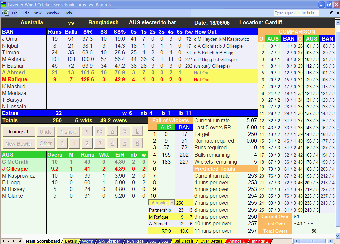
The Laver and Woods Cricket Scorebook features a clean, spreadsheet-based interface that leverages Microsoft Excel’s familiar layout. This design choice enhances usability for users already comfortable with Excel, reducing the learning curve. Navigation is straightforward, with clearly labeled input fields and logical tab order, allowing for efficient data entry during fast-paced matches.
While the developer did not list formal performance metrics, the app’s small file size of 2.4 MB suggests minimal resource consumption. It is expected to run smoothly on a wide range of Windows systems, including older hardware, due to its reliance on Excel 2000 or later. Responsiveness is likely consistent during standard use, though performance may vary depending on the host system’s configuration and Excel version.
Stability appears to be a core strength, given the app’s long-standing presence and the inclusion of post-innings correction features. However, compatibility with modern Windows versions (e.g., Windows 11) has not been explicitly confirmed. Users should ensure their system meets the minimum Excel requirements before installation. Overall, the UX is practical and focused, prioritizing function over visual flair.
Platform Compatibility & Technical Requirements
Laver and Woods Cricket Scorebook is designed for the Windows platform, requiring Microsoft Excel 2000 or a later version. The application has a file size of 2.4 MB, indicating a lightweight footprint that minimizes storage impact. The software version is 1.01, released on June 24, 2011.
Although the developer did not specify minimum OS requirements, the reliance on Excel suggests compatibility with Windows 7 and later, though older versions like Windows XP may also support it. The app is not available for Android, iOS, or other mobile platforms, limiting its accessibility to Windows users only. No additional system requirements, such as RAM or processor specifications, were provided.
Users should note that the app runs as an Excel-based tool, meaning it requires a functional Microsoft Office installation or a compatible alternative (e.g., LibreOffice) to operate. The lack of a standalone installer or mobile version means users must manually manage the file and its dependencies.
Pros and Cons
Pros
- Completely free to download and use
- Lightweight file size (2.4 MB)
- Compatible with Excel 2000 or later
- Supports post-innings corrections
- Offers detailed batting and bowling analysis
- Includes a season statistics package
- Easy to use with keyboard and mouse input
Cons
- Not available for mobile platforms (Android, iOS)
- Requires Microsoft Excel or compatible software
- Released in 2011; may lack modern interface features
- No official updates since version 1.01
- Compatibility with newer Windows systems not confirmed
- Limited technical support or documentation
FAQ
Is Laver and Woods Cricket Scorebook free to use?
Yes, the software is available at no cost. There are no subscription fees or hidden charges.
Can I use this app on my Android or iPhone?
No, the app is designed exclusively for Windows and is not available on Android or iOS platforms.
What do I need to run this software?
You need Microsoft Excel 2000 or a later version installed on your Windows system. A compatible spreadsheet application may also work, but this is not guaranteed.
Is the software regularly updated?
Version 1.01 was released in 2011, and no further updates have been published. The software is considered stable but not actively maintained.
Can I edit scores after the innings ends?
Yes, one of the key features is the ability to correct scoring entries even after the innings has concluded, ensuring accurate record-keeping.
Final Thoughts
Laver and Woods Cricket Scorebook remains a solid, no-cost option for cricket data management, particularly for users who already have access to Microsoft Excel. Its core functionality—accurate scoring, flexible input, and post-game editing—addresses real needs in amateur and club-level cricket. While it lacks modern design and mobile support, its reliability and low barrier to entry make it a valuable tool for coaches, statisticians, and match organizers.
For those seeking a lightweight, free solution to track cricket scores and analyze player performance, this app delivers consistent value. It’s especially useful for teams that prioritize functionality over flashy interfaces. Despite its age, it continues to serve its niche purpose effectively.
Download Laver and Woods Cricket Scorebook now and bring precision to your cricket match records.
Guides & Tutorials for Laver and Woods Cricket Scorebook
How to install Laver and Woods Cricket Scorebook
- Click the Preview / Download button above.
- Once redirected, accept the terms and click Install.
- Wait for the Laver and Woods Cricket Scorebook download to finish on your device.
How to use Laver and Woods Cricket Scorebook
This software is primarily used for its core features described above. Open the app after installation to explore its capabilities.
User Reviews for Laver and Woods Cricket Scorebook 0
No reviews found


